UK Drone Map is now a Progressive Web App (PWA). That means you can install it on your phone, tablet, or laptop straight from the browser — no App Store, no Google Play, no sign-up, no email harvesting, no tracking SDKs. Once installed it runs full-screen, launches from your home screen like any other app, and works offline for the bits that matter most before a flight.
Why a PWA and not a native app?
- Free forever — no Apple Developer fees baked into a paid app, no in-app purchases, no advertising.
- Always up to date — when we ship new airspace data, NOTAM logic, or conservation layers, you get it on your next launch. No "update available" prompt.
- Same map on every device — phone, tablet, desktop, and any browser that supports the open web. The UK FRZ, NOTAM, weather, and SSSI layers behave identically everywhere.
- No App Store gatekeeping — a UK-focused tool for UK pilots, not a global product diluted by App Store policy.
How to install on iPhone / iPad (Safari)
- Open ukdronemap.app in Safari (must be Safari — Chrome on iOS uses a different engine and doesn't support add-to-home-screen for PWAs reliably).
- Tap the Share icon at the bottom of the screen (the square with the upward arrow).
- Scroll down and tap Add to Home Screen.
- Confirm the name (defaults to "UK Drone Map") and tap Add.
The app icon will appear on your home screen. Tapping it launches UK Drone Map full-screen with no Safari address bar — exactly like a native app.
How to install on Android (Chrome / Edge / Samsung Internet)
- Open ukdronemap.app in Chrome (or Edge, Samsung Internet, Brave — anything Chromium-based).
- Look for the Install app banner at the bottom of the screen, or tap the three-dot menu and choose Install app / Add to Home Screen.
- Confirm and you're done — the icon appears in your app drawer alongside everything else.
On Android the installed PWA is treated as a real app: it shows up in app switcher, can be uninstalled like any app, and runs in its own task.
How to install on desktop (Windows, macOS, Linux)
In Chrome, Edge, or Brave, look for the install icon in the right of the address bar (a small monitor with a downward arrow). Click it, confirm, and UK Drone Map opens in its own window — no browser chrome — and pins to your taskbar or dock. Particularly useful on a kit-prep laptop where you want fast launch and full-screen mapping.
Does it work offline?
The app shell loads offline after the first visit — meaning you can pull up UK Drone Map at a remote flying site with no signal and still see the map UI, your saved fleet, your checklists, and the last airspace data your browser cached. What you cannot do offline:
- Fetch fresh NOTAMs (the NOTAM data is fetched live each session)
- Live weather (Open-Meteo requires a connection)
- Search (Nominatim geocoding requires a connection)
- Map tiles for areas you haven't already viewed at that zoom level
The fix for that last one is simple: while you have a signal, pan and zoom over the area you're planning to fly. The browser caches the tiles and the map will still render when you're standing in a field with no bars.
What you get when installed
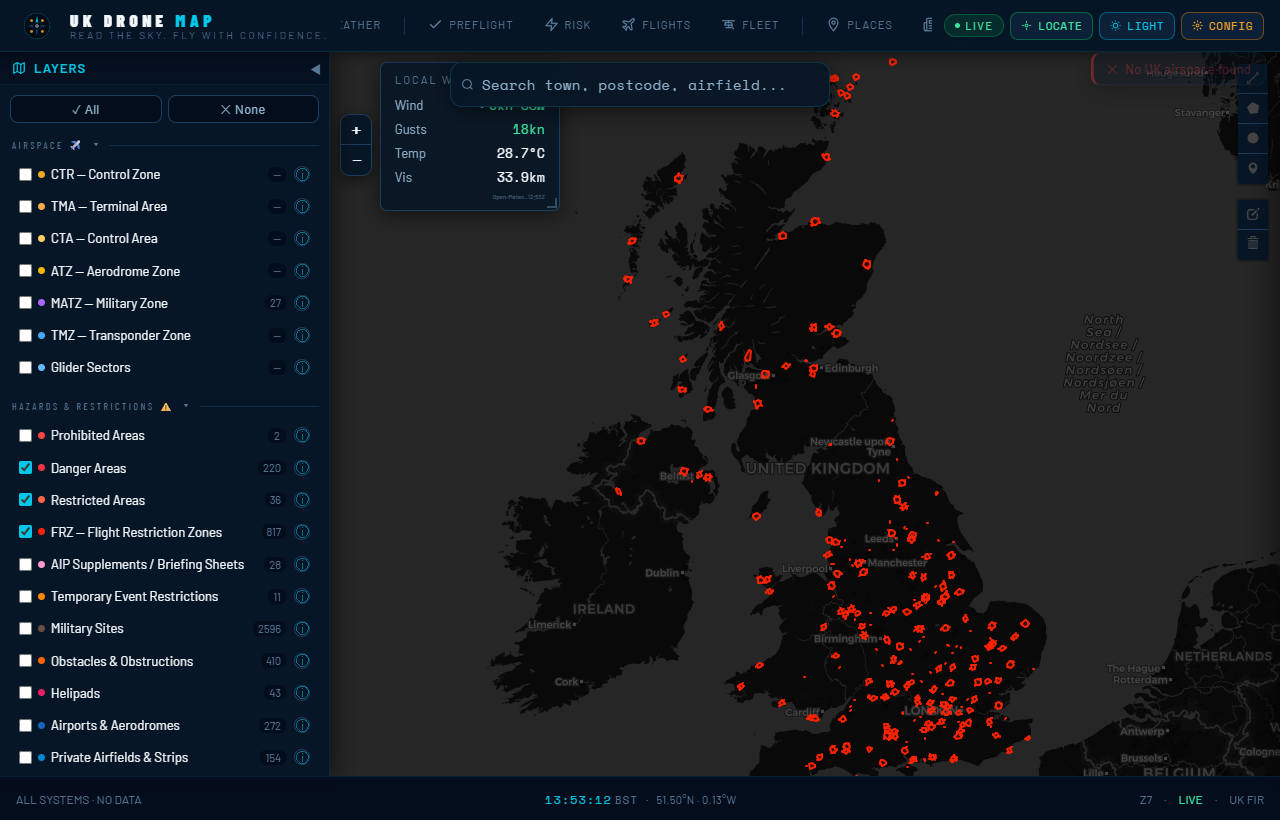
- UK airspace map — CTR, TMA, CTA, ATZ, MATZ, TMZ, Danger / Restricted / Prohibited areas — the same OpenAIP data NATS publishes
- NOTAMs from NATS / UK AIS, with active and future NOTAMs visually distinguished and an in-tab live re-classifier
- Flight Restriction Zones around UK aerodromes (the actual NATS FRZ KML, not approximations)
- Live weather (Open-Meteo) — wind, gusts, precipitation, cloud base
- Conservation overlays — SSSI, SAC, SPA, Ramsar, NNR, AONB, National Parks, MPA, Royal Parks, National Trust land, Forestry Commission. England, Scotland, Wales, and Northern Ireland — all four nations.
- Pre-flight checklist, risk assessment, fleet manager, flight log
- Search for any UK address, airfield, or grid reference
Privacy
UK Drone Map runs entirely in your browser. We do not run a backend that stores your flight plans, your location, your fleet, or your behaviour. Your saved data lives in your browser's local storage on your device. There is no account to create. There is no tracking pixel beyond the privacy-preserving Cloudflare Web Analytics (no cookies, no fingerprinting). Geolocation is requested only when you explicitly tap "use my location".
It is still a planning aid, not a substitute for pre-flight checks
Installing UK Drone Map on your phone does not change what it is: a free reference tool to support your pre-flight planning. You are still legally required to check NOTAMs at ais.nats.aero, comply with the Air Navigation Order 2016, hold a valid Operator ID and Flyer ID for any drone over 250g, and exercise your judgement as the Remote Pilot in Command. The map shows third-party data that may be incomplete or out of date. Verify everything before flight.
Open ukdronemap.app in your phone's browser to install. The whole thing takes longer to read this article than it does to set up.